An action item is a specific task that needs to be completed by a person within a specific period of time.
Think... "thing that needs to be done by a specific due date". You're goal is to get action items followed up on and completed. So first you need to create the action items.
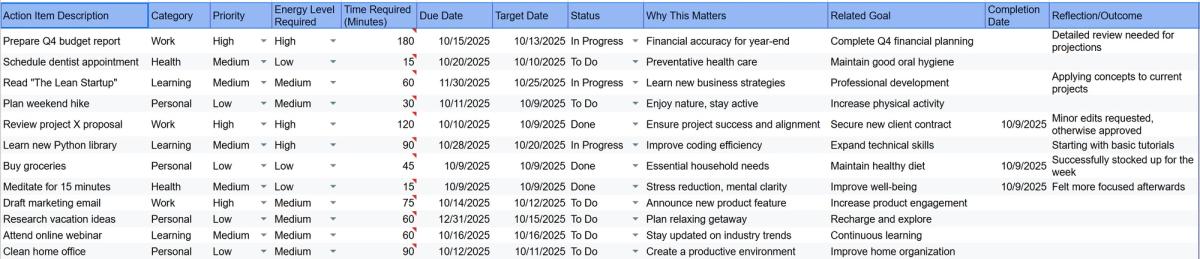
And an action item template? It's simply those things and dates in a structured format organized in one document for easy management.
The key to a good action item template is having all those tasks in one place... not lost in email threads and sticky notes on your desk. It's a standardized system.
You can't just throw your notes into a spreadsheet and call it a day. There are specific elements that need to be present when logging action items into the document. There are 5 to be exact.
A clear task description—this isn't just "follow up with client" but rather "send proposal document to Sarah at ABC Company with updated pricing." Be specific.
Task owner or assignee field. This is the person who's accountable for getting the task done. And this means a specific person. No multiple owners here where nobody takes responsibility
Every action item needs a deadline or due date. Otherwise tasks continue on with no completion.
You need a status indicator. Most templates use simple categories like "Not Started," "In Progress," "Completed," or "Blocked." This gives you instant visibility into where things stand.
And a priority level helps you focus on critical action items. You might use High/Medium/Low or numbers like P1, P2, P3—whatever system makes sense for you.
So are action items just a to-do list or project tasks? No, they are not. Here's why.
To-do lists are personal tasks we all have (like "buy milk" and "pick up dog at groomers") and totally unrelated to work and higher level tasks. When they're done, they're done.
A project task is broad in scope and will include action items that need to be completed so the project task is successful.
"Launch new website" is a project task that would break down into many specific action items like "finalize homepage copy" or "test checkout process on mobile."
Action items sit right between the two. They're specific enough to require action and significant enough to need tracking. We've all come out of meeting or session where a decision is made an action items are assigned (well, hopefully assigned).
Action item templates are useful in many different scenarios. The most obvious is after a meeting. But the the variations of action item templates don't stop there.
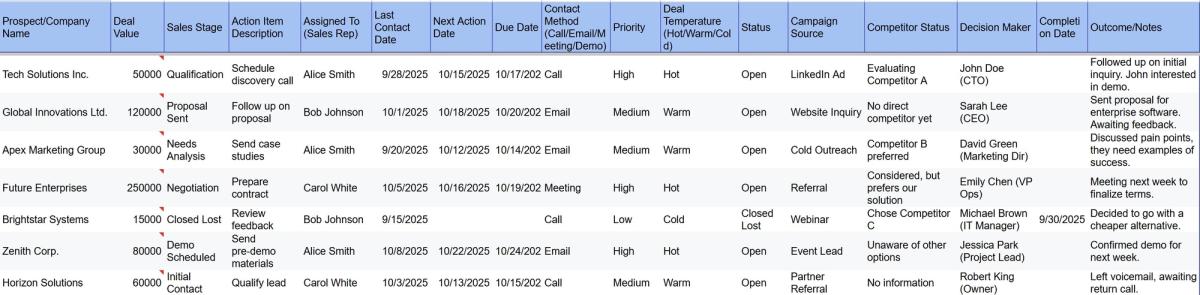
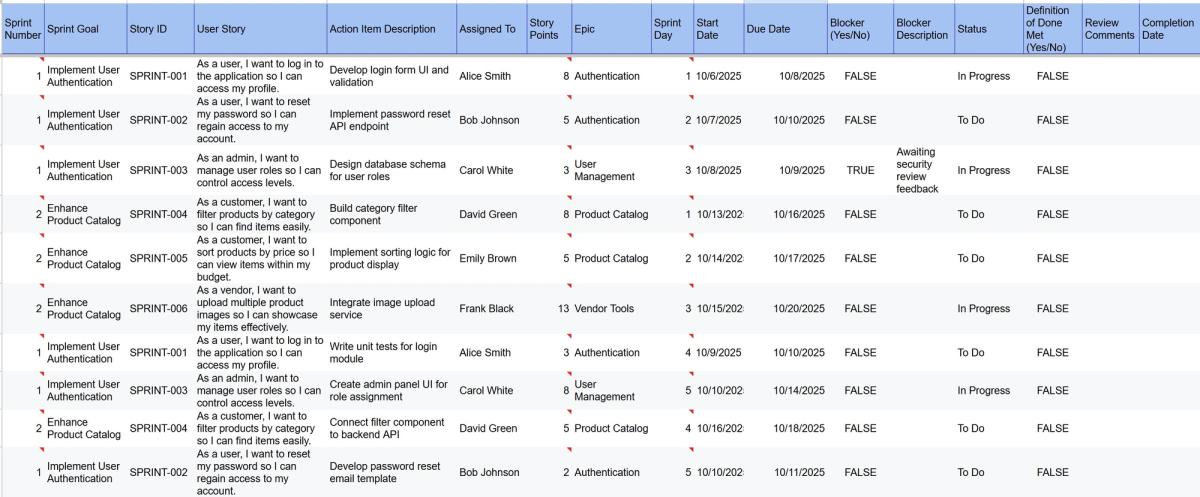
Project management teams use them to track deliverables across different phases of the project.
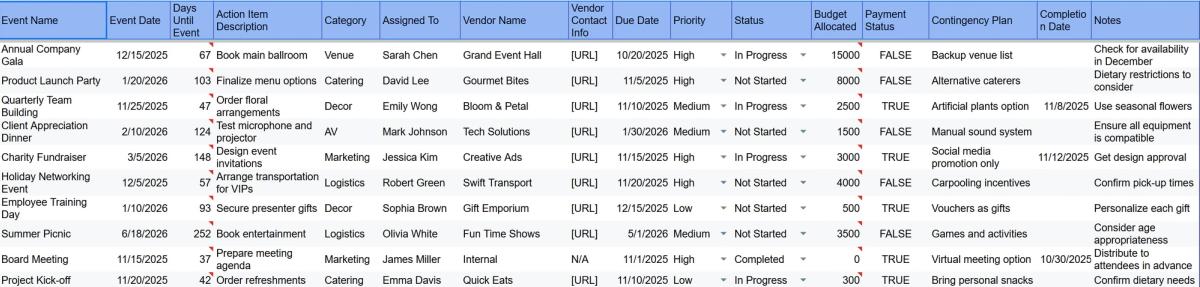
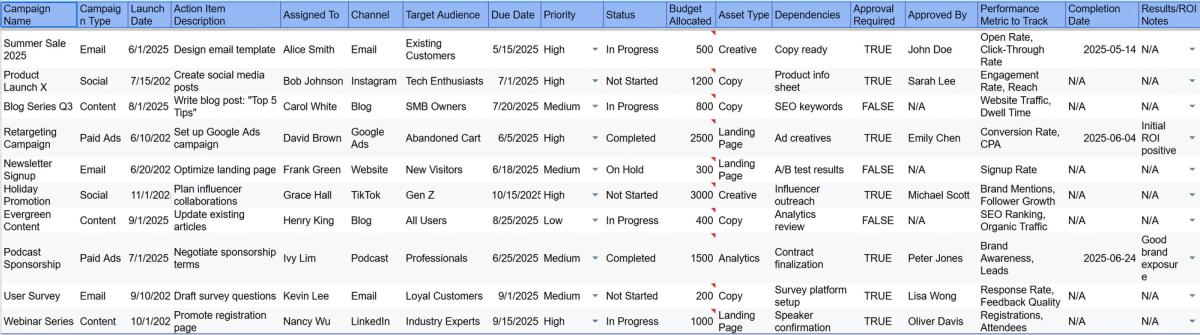
Event coordinators rely on action item templates to manage the hundreds of small tasks that go into the chaos of pulling off a successful event.
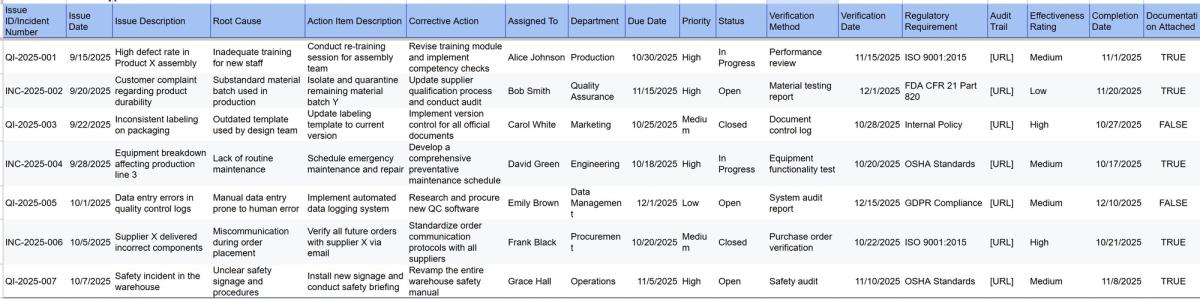
Even quality improvement professionals benefit from tracking action items when implementation of systems need improvement and verification.
11 Free Action Item Templates (Instant Access in Multiple Formats)
Ready to get organized? We've put together three different template formats so you can choose whatever fits the way you work.
All of these templates work on a mobile device too. You can view, edit and update action items right from your phone.
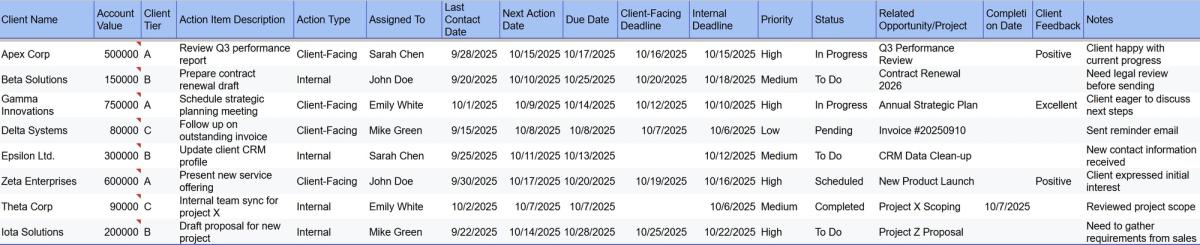
There's an option below every action item template preview, so you can instantly download and copy.
After opening the Excel or Google Sheet file, click File > Download. You can then open your downloaded file and make updates.
1. Basic Meeting Template
Meeting Action Items need to capture decisions and follow-ups. Ideally this happens during the meeting.
Meeting DateMeeting TitleAgenda ItemDescriptionAssigned ToDue DatePriorityStatusContext/NotesDate CreatedFollup-Up Required (Y/N)Completion Date
Accountability happens when you assign an action item to one person and document it, they're motivated to follow through on their commitment.
Meeting productivity gets boost when you're using action item templates because when you capture them they're not just talk. It can be tracked and reported on.
Due dates are manageable when you can view them all in one document. No more searching through email chains for vague references to due dates.
Stress reduction happens because you're not juggling all the tasks and due dates in your head. Free yourself up to do real and creative work.
Completion rates improve when you have a system. Your more likely to do something when it's written down. It's true with everything from business plans to grocery lists. Action item documents are no different.
Reducing costs is a big issue for all of us. Enterprise project management software like Asana, Monday, or Microsoft Project can run on average to $20 per user per month. For a small team of ten people, you're looking at a cost of $2,000 per year. A free action item template in Excel or Google Sheets gives you most of the functionality at no cost. Yeah, there's no automation - but it's free and a well-designed template will do most of what you need.
Customization is another benefit. The simplicity of a template means you can add a column or formula quickly, move columns around, etc. You can't do that with most software platforms. You're locked into their formats and workflow.
Instant startup with an action item template, means you're not spending weeks learning yet another new tool. Spreadsheets are familiar and intuitive to most of us. You can get download it and get started immediately.
How to Use Your Action Item Template Effectively
So you've downloaded your template— now let's hit the highlights of how to fill it out with the goal of getting tasks completed.
Start with the task description field. Be specific here. Don't write "follow up with client". Instead write "email Jennifer at ABC Company with revise proposal for pricing on contract by Thursday". Don't leave room for interpretation.
Assigning ownership to one specific person. That person is then accountable and it's more likely that the action item is completed. They can still collaborate with team members - but one person is responsible.
Setting realistic deadlines is important. We all juggle multiple assignments and you need to be respectful of the workload of the action item assignee. Be flexible with due date assignments. It benefits everyone.
Think about dependencies when setting deadlines. Plan your due dates strategically so work flows smoothly from one task to the next.
Priority levels help you focus on the more important tasks.. A three tier system works well - high, medium and low priority. This helps assignees know where they should focus their efforts first.
Status tracking keeps everyone informed. But keep it simple here. Status of "Not Started", "In Progress", "Completed" , and "Blocked" should work just fine. Just update the status regularly.
Color-coding creates instant visual organization. Your brain likes that. You can color code for any of the columns on the spreadsheet, just don't go overboard and make it cluttered and overwhelming. Stick to three or four colors.
Review the action items on a regular basis. The interval for these reviews will be different for every team and type of project. As the spreadsheet owner, you should review it daily. Just take five minutes to see where you're at and whether any action items are past due.
Consider sending reminders for approaching action items so they don't become past due.
Action Item Template Best Practices for Teams
Few of us work in a silo. And most action item templates will be used by an entire team. One simple approach is to assign on person to update the spreadsheet. That way standards are kept and the effectiveness of the document isn't lost.
But if you go the route of each person updating their own item, here are some useful tips for keeping an entire team in synch related to the action item template.
Schedule a standing 15-20 minute meeting for regular check-ins and status review. Weekly is usually a good for most busy teams.
Daily standups work great for fast-moving projects. Each person quickly shares what they completed yesterday, what they're working on today, and any blockers they're facing. Simple and quick.
Clear ownership of action items. Accountability matters when you need to get tasks completed.
Share the action item template (shared folder, slack channel, etc.) so everyone has access to at least view it. Or you can email the updated version after a meeting so all team members know the status of their action items.
Capturing action items while you're in the meeting. This prevents poor notes and misunderstandings from getting in the action item template. Review the tasks and assignees, so everyone is on board and clear about what they own and when it's due.
8 Common Action Item Tracking Mistakes
Knowing what NOT to do can help you reach your goals. In this case- getting tasks done and moving the project forward.
So here are the "Fateful 8" common mistakes related to action item template. Avoid them and you're guaranteed a more successful project.
Vague task descriptions are the number one reason for incomplete action items. If you're not specific about what needs to get done, you can't expect it to get done. Be specific.
Assigning multiple owners just creates a mess. Multiple owners is called "diffusion of responsibility" - when everyone is responsible, nobody feels responsible. One action item, one owner.
Setting unrealistic deadlines result in missed deadlines and an unhappy team. You're not respecting their schedules and workload. Nobody wants to be set up for failure. Due dates then become meaningless in the eyes of your team. Things don't usually go down the "happy path"- meaning nothing goes as we expect. So pad the due date by 1.5 or even 2... this gives everyone some breathing space.
Failing to prioritize turns your action item list into a confusing laundry list. If everything is "critical" then nothing is "critical". No more than 20% of your items should be critical and then be accurate about which action items are high, medium or low priority.
Neglecting regular review of action items regularly is how templates become ignored and tasks not completed on time. It should be reviewed by you and a group review during regular meeting. Make it consistent. If someone updates an action item with a status "Blocked" and nobody reviews the template, how is the action item ever going to get "unblocked"?
Overly complex templates with vague column names or just too many columns just create confusion. Keep it simple and straightforward. Complex projects can be managed with simple action item templates. Try this: start with just five columns: task description, owner, due date, status, and priority. That's it. You can add columns if you feel the need or if someone request them. This way you're adding them based on team requirements and not because it looks. You want a template that makes life easier and simpler.
Forgetting to mark items complete might seem minor, but it creates confusion. Your template isn't telling the story of what needs to be done and what is completed. And who doesn't like marking a task "Completed"?
Tracking too many items just creates busy work and your action item template lacks focus. You'll end up doing a lot of task tracking and not much task completing. Consider limiting each team member to ten action items (it will vary by team and industry). They can only add a new item after they mark one "Completed". This keeps focus on completing tasks and not just managing them.
Conclusion
Taking control of your tasks doesn't have to be complicated or expensive. Whether you downloaded our Excel, Google Sheets, or the printable PDF, you'll be on your way to completing those action items.
The best template is the one you'll use consistently. Start simple and gradually improve your system for your needs.
Ready to get organized? Download your free action item template now and start checking off those tasks today.
What is an action item template?
It’s a structured document that lists specific tasks, owners, due dates, and statuses — keeping all your action items organized in one place.
Why use an action item template instead of a to-do list?
A to-do list tracks personal tasks. An action item template tracks assigned, time-bound tasks for teams or projects.
Which format should I download — Excel, Google Sheets, or PDF?
Use Excel for offline tracking, Google Sheets for team collaboration, and PDF if you prefer a printable version.
Can I customize the templates?
Yes. You can easily add or remove columns, change priorities, or adjust formatting to match your workflow.
Are these templates mobile-friendly?
Absolutely. All templates can be viewed and edited from your phone or tablet.
How often should I update my action item list?
Ideally daily — or at least before and after meetings — to keep tasks current and visible.
What’s the most common mistake when using action item templates?
Vague task descriptions. Be specific about what needs to be done, who’s doing it, and when it’s due.
Do I need paid software to manage action items?
No. These free templates give you the same organization benefits as paid tools — without the monthly fees.